AI that gives All apps frogmouth
frogmouth
Trim, stabilise and join video clips on a Mac, then export one small file.
- No telemetry
- No ads
- No account
- Open source
- Works offline
About the app
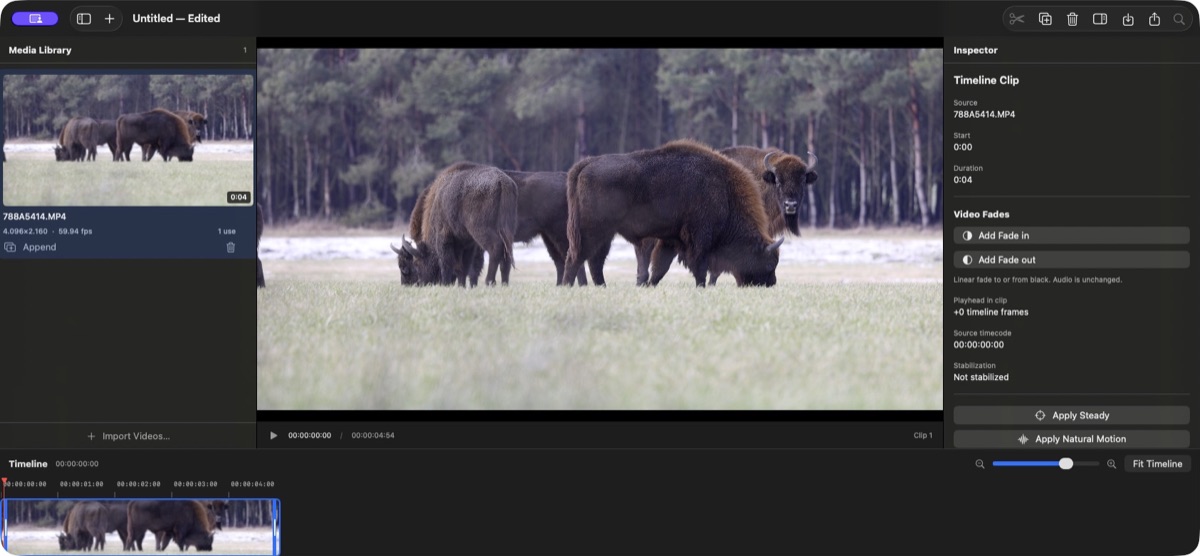
What it does
frogmouth is a free video editor for the few steps most clips need: trim, split, stabilise, put several clips together in a row, add a fade to black, and export the whole sequence as a smaller high-quality HEVC file. Projects are small JSON files; the source videos are never modified.
Who it's for
Anyone with a Mac who wants to tidy up clips without learning professional software. The author built it for wildlife videos from a mirrorless camera and trail cameras.
What it doesn't do
It has no effects library, titles or multi-track editing, and it is not meant to replace professional tools. It needs FFmpeg installed separately, in exactly version 7.1.1 or 8.1.2, and runs only on Apple Silicon Macs with macOS 15 or newer. The build is not signed by Apple, so macOS asks you to allow it once.
For the curious
What I checked
Checked
Installed on my own phone, permissions read from the finished build, network traffic watched. Everything the app downloads comes from one place: a script on GitHub fetches the sources below, turns them into small files and serves them from there. The app never talks to these institutions directly.
Permissions
- Files you openthe videos you choose and the project file you save. Nothing else on the disk.
Talks to
- github.comonly when you choose Check for Updates: it opens the releases page in your browser. The app itself makes no network connection at all.
Not in the app
No analytics, no crash reports, no account, no automatic updates, no installer beyond a disk image, and no system permissions requested.